Master Photorealistic Rendering Techniques for Immersive Projects
- Dec 3, 2025
- 4 min read
Photorealistic rendering is the art of transforming digital models into images so vivid and lifelike that they blur the line between reality and imagination. It’s not just about creating pretty pictures; it’s about crafting immersive experiences that communicate design intent with precision and emotion. Whether you’re visualizing a sleek architectural marvel, an inviting interior, or a cutting-edge product, mastering photorealistic rendering techniques can elevate your projects to new heights.
Let’s dive into the essentials of photorealistic rendering, explore practical tips, and uncover how technology is reshaping this creative frontier.
Understanding Photorealistic Rendering Techniques
Photorealistic rendering is more than just applying textures and lighting. It’s a meticulous process that simulates how light interacts with surfaces, materials, and environments to produce images that mimic real-world photography. But what exactly makes a render photorealistic?
Accurate Lighting: Light is the soul of any image. Techniques like global illumination, ray tracing, and ambient occlusion simulate natural and artificial light sources, shadows, and reflections.
Material Realism: Materials must respond to light authentically. This means using physically based rendering (PBR) materials that define properties like roughness, reflectivity, and translucency.
Camera Settings: Just like a real camera, virtual cameras have settings such as aperture, focal length, and depth of field that influence the final image.
Post-Processing: Color grading, bloom, lens flares, and subtle noise add the finishing touches that make renders feel alive.
For example, when visualizing a modern living room, the soft bounce of sunlight through sheer curtains, the subtle gloss on a polished wooden floor, and the gentle blur of background elements all contribute to a believable scene.
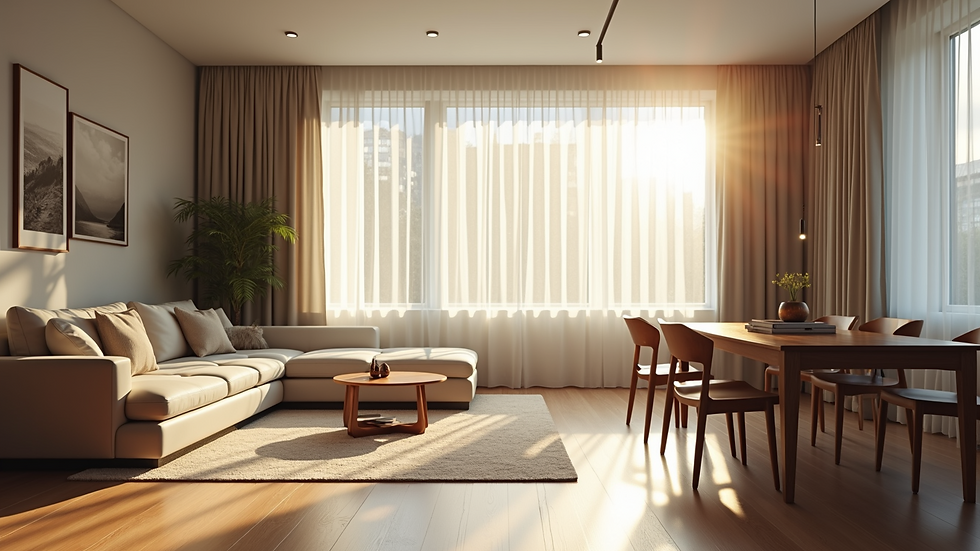
Mastering these techniques requires both technical knowledge and an artistic eye. It’s a dance between science and creativity.
Essential Tools and Software for Photorealistic Rendering
Choosing the right tools can make or break your rendering workflow. Here are some of the most popular and powerful software options that professionals rely on:
Autodesk 3ds Max with V-Ray: A classic combination known for its robust rendering engine and extensive material libraries.
Blender with Cycles: An open-source powerhouse that offers impressive photorealistic capabilities without a price tag.
Cinema 4D with Redshift: Favored for its speed and integration with motion graphics.
Lumion: Ideal for architects and designers who want quick, high-quality visualizations with real-time feedback.
Unreal Engine: Originally a game engine, it’s now a favorite for interactive architectural visualizations and virtual reality.
Each tool has its strengths, but the key is to understand the underlying principles of rendering so you can adapt your workflow accordingly.
Practical Tips for Better Renders
Start with a clean model: Geometry should be optimized to avoid unnecessary polygons that slow down rendering.
Use HDRI maps for lighting: High Dynamic Range Images provide realistic environmental lighting and reflections.
Pay attention to scale: Incorrect scale can ruin material appearance and lighting behavior.
Experiment with camera angles: Sometimes the best shot is not the obvious one.
Leverage render passes: Breaking down your render into layers (diffuse, specular, shadows) allows for more control in post-processing.
Can AI Render My 3D Model?
Artificial Intelligence is no longer a futuristic concept; it’s actively transforming photorealistic rendering. But can AI truly render your 3D model? The answer is both yes and no.
AI-powered tools can accelerate rendering by optimizing light calculations, denoising images, and even generating textures. For instance, NVIDIA’s AI denoisers can reduce render times dramatically without sacrificing quality. Some platforms offer AI-assisted material creation, automatically generating realistic textures from simple inputs.
However, AI is not yet a full replacement for human creativity and technical expertise. It excels as a powerful assistant, speeding up repetitive tasks and enhancing image quality, but the artistic decisions—composition, lighting mood, storytelling—still require a skilled eye.
Imagine AI as a master craftsman’s apprentice, handling the heavy lifting while the expert focuses on the finer details.

As AI continues to evolve, it will become an indispensable part of the rendering toolkit, but mastering the fundamentals remains essential.
Integrating Photorealistic Rendering into Your Workflow
How do you seamlessly incorporate photorealistic rendering into your project pipeline? Here’s a step-by-step approach that balances efficiency and quality:
Concept and Modeling: Begin with a clear vision and detailed 3D model. Accuracy here saves time later.
Material Setup: Assign PBR materials with attention to real-world properties.
Lighting Design: Choose your lighting setup based on the scene’s mood and time of day.
Camera Placement: Experiment with angles and settings to find the most compelling composition.
Test Renders: Run low-resolution previews to check lighting and materials.
Final Render: Use high-quality settings and render passes.
Post-Processing: Adjust colors, add effects, and composite layers for the final polish.
This workflow is adaptable whether you’re working on architectural visualizations, interior designs, or product prototypes. For those who prefer to outsource, partnering with expert 3d rendering services can ensure stunning results delivered on time.
Elevate Your Projects with Photorealistic Rendering
Photorealistic rendering is more than a technical skill; it’s a storytelling tool. It invites viewers to step inside your vision, feel the texture of materials, and experience the ambiance you’ve crafted. When done right, it can transform concepts into compelling narratives that resonate deeply.
Are you ready to master these techniques and bring your projects to life with breathtaking clarity? The journey requires patience, practice, and passion—but the rewards are immense. With every render, you sharpen your ability to communicate, persuade, and inspire.
In the end, photorealistic rendering is not just about images. It’s about creating windows into worlds yet to be built.


Comments