Understanding Essential 3D Rendering Techniques
Updated: Aug 26, 2025
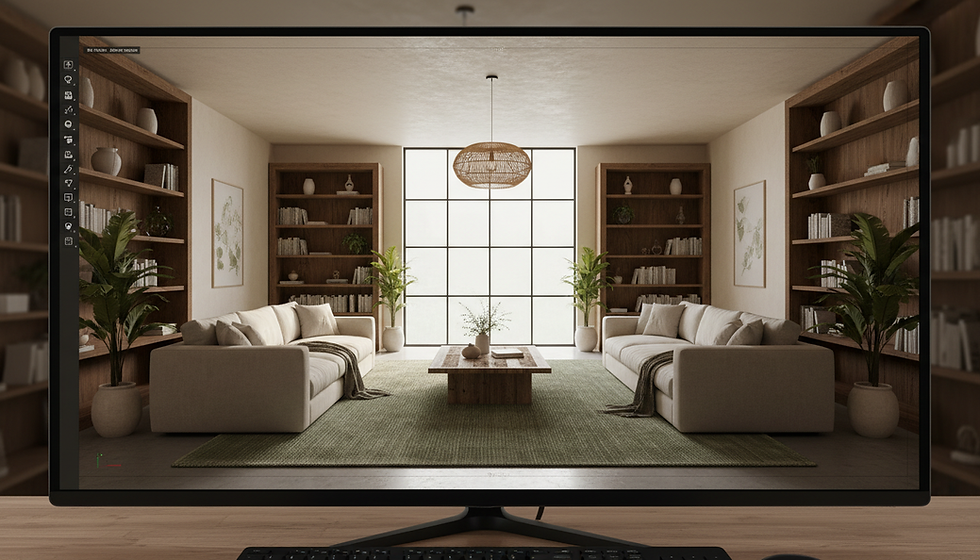
In the world of design and development, visualization is the bridge between imagination and reality. 3D rendering transforms abstract ideas into vivid, tangible images that speak louder than words. But what exactly makes a 3D render captivating and effective? Let’s dive into the essential techniques that elevate your projects from sketches to stunning visual experiences.
3D Rendering Essentials: The Foundation of Realism and Impact
At its core, 3D rendering is about simulating reality through digital means. It’s not just about creating pretty pictures; it’s about crafting images that communicate design intent with precision and emotion. To achieve this, several fundamental techniques come into play:
Modeling: The skeleton of your project. Accurate geometry forms the basis of any successful render. Whether it’s a sleek product or a sprawling architectural complex, the model must be detailed and true to scale.
Texturing: This adds the skin and fabric to your model. Textures define surface qualities like wood grain, metal sheen, or fabric weave. Without textures, a model looks flat and lifeless.
Lighting: The soul of the scene. Lighting sets the mood, highlights features, and creates depth. Natural light, artificial light, shadows - all must be balanced to mimic real-world conditions.
Camera Angles: Just like photography, the viewpoint influences perception. Eye-level views offer familiarity, while high or low angles can dramatize or emphasize scale.
Rendering Engine: The software’s heart that calculates how light interacts with surfaces. Different engines offer various levels of realism and speed.
Mastering these essentials means understanding how they interplay to create a believable and engaging image. For example, a well-modeled chair with realistic leather texture and soft shadows under warm lighting invites viewers to imagine sitting in it.

Advanced Techniques to Elevate Your 3D Visuals
Once the basics are in place, advanced techniques can push your renders into the realm of artistry and hyper-realism. These methods add layers of complexity and nuance that captivate viewers and convey subtle messages.
Global Illumination and Ambient Occlusion
Global Illumination (GI) simulates how light bounces off surfaces, illuminating areas indirectly. This technique adds realism by avoiding unnaturally dark shadows and creating soft, natural light diffusion. Ambient Occlusion (AO) complements GI by darkening crevices and corners where light struggles to reach, enhancing depth perception.
Physically Based Rendering (PBR)
PBR uses algorithms that mimic the physical properties of materials. This means metals reflect light differently than plastics, and wet surfaces appear glossy while dry ones remain matte. PBR ensures consistency across different lighting environments, making your renders adaptable and believable.
Depth of Field and Motion Blur
These effects borrow from photography to add focus and dynamism. Depth of Field blurs background or foreground elements, guiding the viewer’s eye to the subject. Motion Blur simulates movement, useful for product demos or architectural walkthroughs where elements like fans or vehicles are in motion.
Post-Processing
After rendering, images often undergo post-processing to enhance colors, contrast, and sharpness. This step can also add atmospheric effects like fog, lens flares, or subtle glows, enriching the visual story.

What is the cost of 3D walkthrough rendering?
Understanding the cost of 3D walkthrough rendering is crucial for budgeting and project planning. Prices vary widely depending on several factors:
Complexity of the Project: Larger spaces with intricate details require more time and computing power.
Level of Detail: High-resolution textures, advanced lighting, and realistic animations increase costs.
Duration of the Walkthrough: Longer walkthroughs need more frames and rendering time.
Revisions and Customization: Additional changes or bespoke elements add to the price.
Typically, a basic walkthrough for a small interior might start at a few hundred dollars, while complex architectural walkthroughs can run into thousands. Investing in quality walkthroughs pays off by providing clients and stakeholders with immersive experiences that static images cannot match.
For those seeking professional assistance, partnering with a reliable 3d render service ensures access to expertise, cutting-edge technology, and tailored solutions that fit your project’s scope and budget.

Practical Tips for Optimizing Your 3D Rendering Workflow
Efficiency and quality go hand in hand. Here are actionable recommendations to streamline your rendering process without sacrificing excellence:
Start with a Clear Concept
Define your goals and key features before modeling. This focus saves time and avoids unnecessary details.
Use Reference Materials
Gather photos, sketches, and material samples to guide texturing and lighting choices.
Optimize Models
Keep polygon counts manageable. Use normal maps and bump maps to simulate detail without heavy geometry.
Leverage Lighting Presets
Many rendering engines offer presets for different lighting scenarios. Customize these to fit your scene.
Test Render Frequently
Quick previews help catch issues early, preventing costly re-renders.
Invest in Hardware
A powerful GPU and ample RAM significantly reduce rendering times.
Collaborate with Experts
When in doubt, consult or outsource to professionals who specialize in 3D visualization.
By integrating these tips, you can produce stunning visuals faster and with greater confidence.
Bringing Your Vision to Life with 3D Rendering
The journey from concept to compelling imagery is a blend of art and science. Each technique, from modeling to post-processing, plays a vital role in telling your story. Whether showcasing a new building, designing an interior, or presenting a product, 3D rendering transforms ideas into immersive experiences.
Remember, the right partner can make all the difference. A trusted 3d render service offers not just technical skill but a shared passion for clarity and detail. Together, you can create visuals that inspire, persuade, and captivate.
Embrace these essentials and advanced techniques. Let your projects shine with the power of 3D rendering - where imagination meets reality in perfect harmony.


Comments