3D Walkthrough vs Virtual Tour Understanding Their Key Differences for Your Property Projects
When showcasing a property, whether residential, commercial, or hospitality, choosing the right visualization tool can make all the difference. Two popular options are 3D walkthroughs and virtual tours. Both offer immersive experiences but serve different purposes and audiences. Understanding their key differences helps architects, developers, real estate agents, and homeowners select the best option for their project goals.
This article explains what a 3D walkthrough and a virtual tour are, highlights their main differences, and offers practical advice on when to use each. We also cover cost, production time, viewer control, and sharing options. A simple comparison table summarizes the key points to help you decide which format fits your needs.
What Is a 3D Walkthrough?
A 3D walkthrough is a guided, animated video that takes viewers on a predetermined path through a digital model of a property. It simulates walking through the space, showing rooms, architectural details, and design elements in a smooth, cinematic way.
Typically created using 3D animation software.
The path and camera angles are controlled by the creator.
Viewers watch the video passively without changing the perspective.
Often used to highlight design features and the flow of a space.
For example, an architect might use a 3D walkthrough to present a new residential development, guiding potential buyers through the layout and finishes before construction begins.
What Is a Virtual Tour?
A virtual tour is an interactive experience that allows users to explore a property at their own pace. It usually consists of 360-degree panoramic images or 3D scans linked together, enabling viewers to click through rooms and look around freely.
Provides interactive exploration rather than a fixed path.
Viewers control where to go and what to see.
Can include hotspots with additional information, videos, or links.
Commonly used in real estate listings and hospitality to give a realistic sense of space.
For instance, a real estate agent might offer a virtual property tour online, letting buyers navigate a home remotely and examine details from different angles.
Main Difference Between Guided Video and Interactive Exploration
The core difference lies in viewer control:
A 3D walkthrough is a guided video where the creator decides the route and views. It’s like watching a movie of the property.
A virtual tour lets viewers explore independently, choosing where to look and move next.
This distinction affects how users experience the property and what information they can gather.
When to Use a 3D Walkthrough
Choose a 3D walkthrough when you want to:
Tell a specific story about the property’s design and flow.
Highlight architectural features with precise camera angles.
Present unbuilt or conceptual projects with high-quality 3D animation.
Create a polished, cinematic presentation for investors or clients.
For example, a developer launching a new commercial complex might use a 3D walkthrough to showcase the building’s exterior, lobby, and office spaces before construction starts.
When to Use a Virtual Tour
Opt for a virtual tour when you want to:
Give potential buyers or tenants control over their viewing experience.
Show existing properties with real photos or 3D scans.
Provide detailed exploration of interiors, including different rooms and angles.
Offer an accessible online experience for remote viewers.
A hotel marketing team might use an interactive virtual tour to allow guests to explore rooms, amenities, and event spaces before booking.
Can Both Be Created for Unbuilt Properties?
Yes, both 3D walkthroughs and virtual tours can be created for properties that are not yet built.
3D walkthroughs are ideal for unbuilt projects because they use fully rendered 3D models and animations.
Virtual tours can also be made using 3D renderings or architectural walkthrough software that stitches panoramic views together, though this is less common.
Using these tools early in the design phase helps stakeholders visualize the final result and make informed decisions.
Key Differences in Cost, Production Time, Viewer Control, and Sharing
Feature | 3D Walkthrough | Virtual Tour |
Viewer Control | Limited (guided path) | Full (interactive exploration) |
Best Use | Showcasing design flow and features | Allowing detailed self-guided tours |
Suitable Project Types | Residential, commercial, hospitality | Residential, commercial, real estate |
Source Files Required | 3D models, animation software | 360° photos, 3D scans, or renderings |
Sharing Platforms | Video platforms, presentations | Websites, real estate portals |
Main Advantages | Cinematic storytelling, high detail | User engagement, flexible viewing |
Cost and production time vary depending on project complexity:
3D walkthroughs usually require more time and budget due to animation and rendering.
Virtual tours can be quicker and less expensive, especially if based on photos or scans.
How Architects, Developers, Real Estate Agents, and Homeowners Can Choose the Right Option
Architects often prefer 3D walkthroughs to communicate design intent clearly to clients and contractors.
Developers use walkthroughs to market unbuilt projects and attract investors.
Real estate agents benefit from virtual tours to showcase existing properties and engage buyers online.
Homeowners can use virtual tours to sell their homes or plan renovations interactively.
Consider your audience, project stage, and budget when deciding. Sometimes, combining both formats offers the best results.
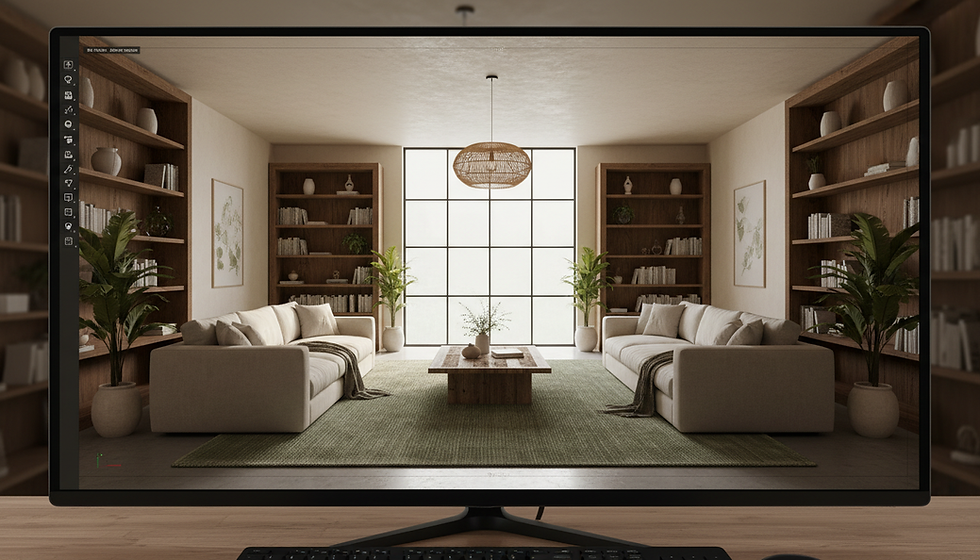
3D walkthrough showing a modern living room interior with natural lighting and furniture
Can Both Formats Be Used Together?
Yes, combining a 3D walkthrough and a virtual tour can provide a comprehensive visualization package:
Start with a 3D walkthrough to guide viewers through the overall design and highlight key features.
Follow with a virtual tour that lets users explore specific areas in detail at their own pace.
This approach works well for large projects like residential developments, commercial offices, or hotels where both storytelling and exploration add value.
Practical Examples Across Different Project Types
Residential: A developer uses a 3D walkthrough to present a new apartment complex, then offers virtual tours of model units online.
Commercial: An office building project features a walkthrough video for investors and a virtual tour for prospective tenants to explore floor plans.
Hospitality: A hotel chain creates a walkthrough to showcase the lobby and amenities, paired with virtual tours of guest rooms and event spaces.
Real Estate: Agents use virtual tours for existing homes and 3D walkthroughs for new construction listings to attract buyers.
Summary Table of Key Differences
Aspect | 3D Walkthrough | Virtual Tour |
Viewer Control | Passive, creator-controlled | Active, user-controlled |
Best Use | Design storytelling, unbuilt projects | Property exploration, existing homes |
Suitable Projects | New builds, architectural presentations | Sales, rentals, hospitality |
Source Files | 3D models, animations | 360° photos, 3D scans, renderings |
Sharing Platforms | Video sites, presentations | Websites, real estate portals |
Main Advantages | High-quality visuals, narrative flow | Interactive, flexible viewing |
Choosing between a 3D walkthrough and a virtual tour depends on your project goals, audience, and budget. Both formats offer unique benefits and can be combined for maximum impact.
If you want expert advice on selecting the right visualization tool or need a custom package combining walkthroughs and virtual tours, contact 3D Visionaries. Our team specializes in creating tailored real estate visualization solutions that bring your property projects to life.
Meta description: Compare a 3D walkthrough and a virtual tour, including viewer control, applications, costs, and the best option for your property project.


Comments